First-party and server-side cookies: why your website forgets returning visitors
This post explains what first-party and server-side cookies are, why browsers treat them differently, and where longer memory makes the biggest difference.
We've spent months working on improving the identification rate for our customers. Triggerbee now supports server-side cookies, and we run them on triggerbee.com ourselves. Longer cookie lifetimes improve website visitor identification, personalization, audiences, loyalty programs, analytics and much more, especially if many of your visitors use an iPhone.
Most marketers know the feeling of looking at a report and not quite trusting it. The share of new visitors looks too high. A popup a visitor closed last week shows up again. A loyal customer gets a welcome offer meant for strangers. Often your setup is fine. The browser has deleted the memory your website relies on.
What a cookie does for a marketer
A cookie is a small note a website asks the browser to keep. When the visitor comes back, the browser hands the note back, and the website knows it has seen this person before. Everything you measure as returning visitors, frequency, segments or personalization starts with that note.
There are two kinds of notes worth knowing about. A third-party cookie belongs to another company's domain, typically an ad network that follows people across many sites. Browsers have spent years blocking those, and most marketers have adjusted. A first-party cookie belongs to your own domain and only works on your own site. It's the kind of memory visitors expect a website to have, browsers still allow it, and it's where your first-party data starts.
What fewer people know is that first-party cookies also come in two kinds, depending on who writes the note.
Why browsers forget your visitors after a week
Most marketing tools write their cookie with a script that runs in the browser. It's easy: you paste a tracking code into your site and you're done. By default, Triggerbee works this way too.
The trouble is that ad trackers use the same technique, so browsers have grown suspicious of it. Since 2019, Safari's Intelligent Tracking Prevention deletes cookies written by a script after seven days without a visit. Other privacy-focused browsers have similar rules.
Seven days sounds generous until you look at how people shop. Someone who browses sofas on a Sunday and comes back two weeks later to buy looks like a brand new visitor. So does the B2B buyer who read your pricing page before a holiday, and the loyalty member who visits once a month.
This isn't only about people using Safari on a Mac. On iPhone and iPad, most browsers run on Apple's engine, Chrome included, so the same rules apply there. For most consumer brands, that's a large share of all traffic.
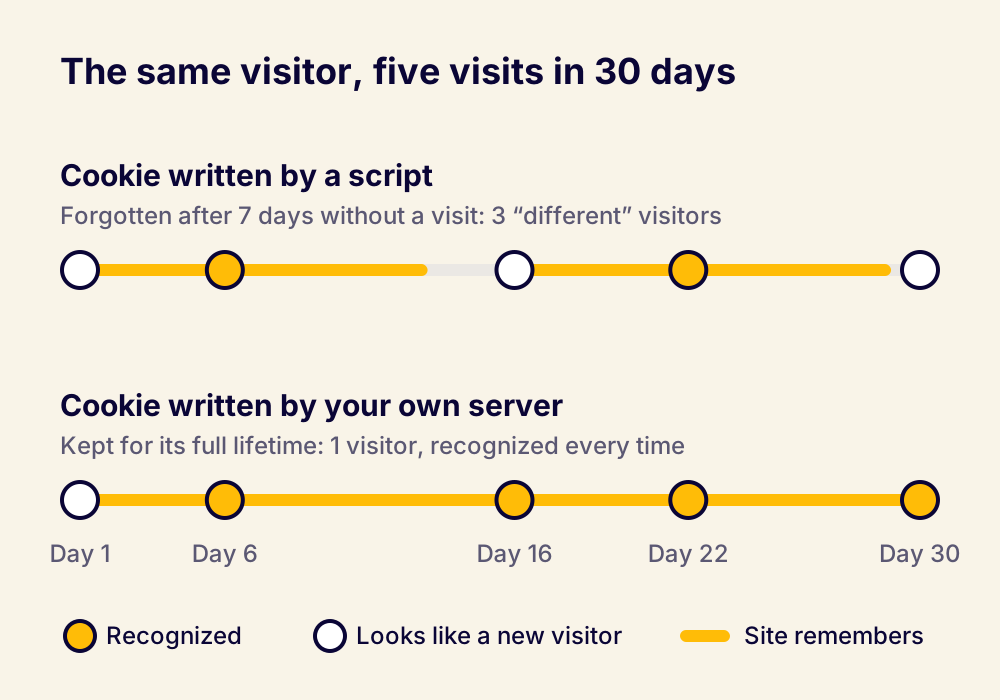
The effects spread through everything you do. Your share of new visitors goes up and your returning visitors shrink, and the difference is people you already knew. A campaign meant to show once shows again. A visitor in an A/B test lands in a different variant the second time. Every personalization rule that depends on history starts from zero for anyone who visits less than once a week, which describes most of your customers.
What Intelligent Tracking Prevention is, and why marketers feel it
Intelligent Tracking Prevention, or ITP, is Apple's set of privacy rules in WebKit, the engine behind Safari and most browsers on iPhone and iPad. Apple introduced it in 2017 and has tightened it almost every year since. Its goal is to stop companies from following people across websites, and it works on several fronts at once.
Safari blocks all third-party cookies by default, so another company's cookie can't follow a visitor from site to site. It limits first-party cookies written by scripts to seven days without a visit. If the visitor arrived through a link from a domain Safari classifies as a tracker, with an identifier added to the address, the limit drops to 24 hours. Safari also uses machine learning on the device to spot domains that behave like cross-site trackers, and deletes what they've stored. In private browsing, it removes known click identifiers such as Google's gclid and Meta's fbclid from the links people open. And it restricts what a site can read about the device, such as installed fonts, so a visitor can't be recognized by their device's fingerprint instead.
ITP doesn't separate your own marketing tools from an ad network that follows people around the web. Anything that writes cookies with a script falls under the same rules, and that touches most of the numbers marketers work with.
Attribution is the first to suffer. When a visitor clicks an ad, leaves and buys ten days later, the cookie that connected the purchase to the click is gone. Multi-touch attribution models lose every conversion that happens after the seven-day mark, or after 24 hours for some ad clicks, and give the credit to the last visit or to direct traffic instead. Channels that start journeys look weaker than they are.
Remarketing suffers next. Audiences built with pixels shrink, because the identifiers behind them disappear before people come back. And on your own site, analytics and personalization lose the thread for everyone who visits less than once a week.
Many companies have responded by moving tracking to the server: server-side Google Tag Manager, or routing tracking through a subdomain or their CDN, so their own servers set durable first-party cookies that ITP's limit on scripts doesn't touch. Server-side cookies in Triggerbee follow the same principle.
What changes with a server-side cookie
A server-side cookie is the same small note, but your own web server writes it instead of a script in the browser. Browsers see that as a deliberate choice by the site the visitor is on, and let the cookie live for the lifetime it was given.
For that to work, the tracking has to go through your own website. You set up a path on your domain, for example yourdomain.com/tb, that passes requests on to Triggerbee and passes the answers back. Developers call this a reverse proxy. To the browser, it's talking to your website the whole time, and your website is the one that sets the cookie.
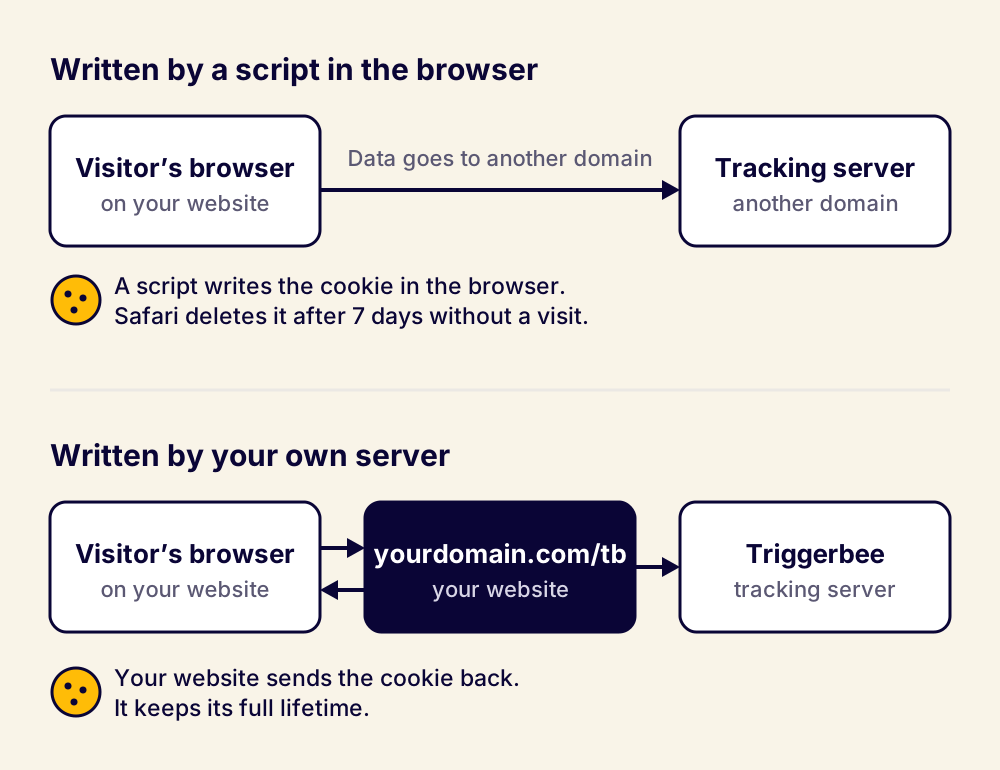
Safari has closed older shortcuts. Pointing a subdomain at a tracking vendor's servers used to work, but since 2023 Safari checks where a cookie comes from and gives cookies from outside servers the same seven days. A proxy on your own site passes that check, because the answer comes from your own servers.
Nothing changes for the visitor. The page looks and loads the same, and the same consent rules apply. The difference is that your site can remember them for as long as they've agreed to be remembered.
Benefits and downsides at a glance
The five biggest benefits:
- More returning visitors recognized. People who come back after a week or more are no longer counted as new.
- More accurate data. New versus returning visitors, frequency limits, A/B tests and attribution all rest on recognizing people.
- Personalization that builds over time. Campaigns can use what a visitor did weeks or months ago, not only last week.
- Preferences that last. Member status, app use, chosen sizes and closed popups are remembered.
- Cleaner ad audiences. Returning customers are less likely to end up in campaigns meant to find new ones.
The five biggest downsides:
- It takes a developer. Someone has to set up a proxy path on your website and test it.
- It needs access to your setup. You need control over your web server, your CDN or your storefront code. Fully hosted platforms can make that hard.
- It's a one-way switch. Going back to script cookies loses the visitor history you've built.
- It covers one domain. Only your primary domain and its subdomains get the longer memory.
- Your site carries the tracking traffic. Tracking requests run through your own servers, and installs through the Google Tag Manager template have to change.
Better recognition and better data
The first thing you notice is recognition. More of the people who come back are counted and treated as returning visitors, because a gap of a week or two no longer wipes them out. On triggerbee.com, the identification rate went up: more visitors were known, and known for longer.
Better recognition leads to better data. When fewer returning visitors get counted as new, your split between new and returning describes reality. Frequency limits work as intended, test groups stay stable for the length of the test, and you can follow a visitor's path further back than a week. Decisions built on that data get better too.
It also gives every interaction a longer life. A quiz answer, a chosen category, a closed popup or a login used to be forgotten after a quiet week. Now it stays useful for months.
What it means for personalization and ads
Personalization is memory put to work. Showing a visitor the category they browsed last time, the size they picked or the offer they almost took all depends on knowing who they are when they return. With a seven-day memory, most of that work resets before it can pay off.
Longer memory also changes what you can build. An engagement campaign can follow a visitor's interest across a whole season. A welcome offer can stay away from someone who signed up a month ago, even if they come back without logging in. A campaign can show less often, because you know who has already seen it, and that makes it feel less like an interruption.
The same logic applies to advertising. Retargeting audiences and exclusion lists are built from the people your site recognizes. When a returning customer looks like a stranger, they can end up in campaigns meant to find new customers, and you pay to win them a second time. A first-party identity that lasts helps keep audiences complete and existing customers out of acquisition spend.
Loyalty programs and app users
Loyalty members are often your most valuable visitors, and they rarely log in. A member might log in once to check their points and then visit without logging in for weeks. With a server-side cookie, your site still knows it's a member on those later visits. You can show member prices, their points balance or the next reward, instead of an invitation to join a program they're already in.
The same goes for app users. If someone already uses your app, a banner asking them to download it wastes space and mildly annoys them. With a cookie that lasts, you can remember that they're an app user and show them something more useful.
What it means for ecommerce brands
Buying cycles in ecommerce are often longer than a week. People research furniture, electronics, outdoor gear and seasonal fashion over several visits spread across weeks. In our Black Week data, traffic started rising around Singles Day, more than two weeks before Black Friday, and shoppers came back several times before they bought. That is exactly the behavior a seven-day memory loses.
With a cookie that lasts, the visitor who signed up for early access is still recognized when the sale starts. The products they looked at are still there when they return. And a reminder about an abandoned cart reaches the person who left it, not someone the site thinks is new.
What it means for B2B companies
B2B buying is slow. A buyer reads a guide, comes back weeks later for pricing, sends the site to colleagues and returns before a meeting. Each gap longer than a week breaks the thread when a script writes the cookie.
For B2B teams working with website visitor identification, longer memory means the person who filled in a form in January is still known when they return in March. Sales sees the whole history of interest, and marketing can show content that fits where the buyer is in their decision, instead of introducing the company again.
What it takes to set it up
The idea is the same everywhere: a path on your own domain, /tb by default, that passes Triggerbee's traffic through to us and the answers back to the visitor. Where you build that path depends on what sits between your visitors and your store.
Most modern ecommerce sites are built in layers. At the bottom, a commerce platform holds products, prices, orders and customers. Shopify, Centra, Norce, WooCommerce, Adobe Commerce and Salesforce Commerce Cloud are common examples. On top sits the storefront, the pages your visitors see. Many platforms render the storefront themselves, but more and more brands build a separate, headless storefront in a framework like Next.js, hosted on a service like Vercel or Netlify, that fetches products from the platform. In front of it all, a content delivery network, or CDN, such as Cloudflare, Fastly or Akamai serves the pages fast and protects the site.
The proxy can live in any layer you control:
- Behind Cloudflare, a small Cloudflare Worker routes /tb to Triggerbee without touching the site itself. That's how we run it on triggerbee.com.
- A headless storefront in Next.js or a similar framework can forward /tb with a rewrite rule or an edge function in its own configuration.
- WordPress, WooCommerce and other PHP sites can run a short PHP script on the web server.
- Sites on your own servers with Nginx, Apache or IIS need a forwarding rule for the path.
- Enterprise CDNs such as Fastly, Akamai or AWS CloudFront can handle it at the edge.
Fully hosted platforms are the hard case. When the platform runs the servers and the domain for you, as Shopify does, you usually can't add your own path on the store's domain. Talk to us before you start, so we can look at your setup together.
For a developer who knows your stack, this is a small and well-known piece of work. We have ready-made guides for Cloudflare and for PHP sites, and the same pattern works on most other platforms. Most of the time goes into testing, because the order of the steps matters.
The trade-offs
It's more work than pasting a tracking code, and it adds a part to your site that has to keep working. Every tracking request now passes through your own servers or CDN, so they need room for the extra traffic, and the /tb path must never be cached, or one visitor's answer could be served to another.
The switch goes one way. Moving from script cookies to server cookies carries your existing visitors over the next time they load a page, but switching back would lose that history. Turn it on when you're ready to keep it.
It covers one domain. The cookie lives on your account's primary domain and its subdomains. If you run separate domains for different markets or brands, the main domain gets the benefit, and new visitors on the others may not be tracked.
Some setups need adjusting. If you install Triggerbee with its Google Tag Manager template, you'll move the tracking code to a custom HTML tag or into your site's code, because the template can't route through your own domain. The event templates keep working.
It doesn't replace consent. A server-side cookie is still a cookie, and where the law requires consent for it, you still need that consent. It also can't help when someone clears their cookies or browses in a private window. What it does is keep the memory a visitor has agreed to, instead of letting the browser throw it away after a week.
And it's new. Server-side cookies are in beta in Triggerbee, and our support team helps you through the setup.
How to get started
The setup has three steps, and the order matters. First, create the proxy path on your site and test it. Then change your tracking code so it loads from your own domain. Only when both work, turn on server-side cookies in your Triggerbee account settings. Our guide to first-party and server-side cookies with Triggerbee walks through each step, and you can reach us at support[at]triggerbee[dot]com if you want help.
FAQ
What are cookies in a browser?
Cookies are small pieces of text a website asks your browser to store. The browser sends them back each time you visit the same site, which lets the site remember your login, your cart, your language or that you've been there before. Each cookie belongs to one domain, and the browser decides how long it may live.
What are server-side cookies?
A server-side cookie is a cookie that the website's own server sets when it answers the browser, instead of a script running in the page. Browsers treat it as a deliberate choice by the site, so Safari doesn't cut its lifetime to seven days the way it does for cookies written by scripts.
How do server-side cookies work?
Every time your browser asks a website for something, the server answers with the content and can add an instruction to store a cookie. The browser saves it and sends it back on later visits. With Triggerbee, tracking goes through a path on your own domain, so your server gives that answer and sets the cookie, while Triggerbee does the tracking behind it.
What's the difference between a server-side cookie and a client-side cookie?
Who writes it. A client-side cookie is written by a script in the visitor's browser, such as a tracking code. A server-side cookie is set by the website's server. Both can be first-party cookies on your own domain, but browsers trust them differently: Safari deletes cookies written by scripts after seven days without a visit, while cookies set by your own servers keep the lifetime they were given.