
Customer satisfaction score (CSAT)
Jul 4, 2024
Definition
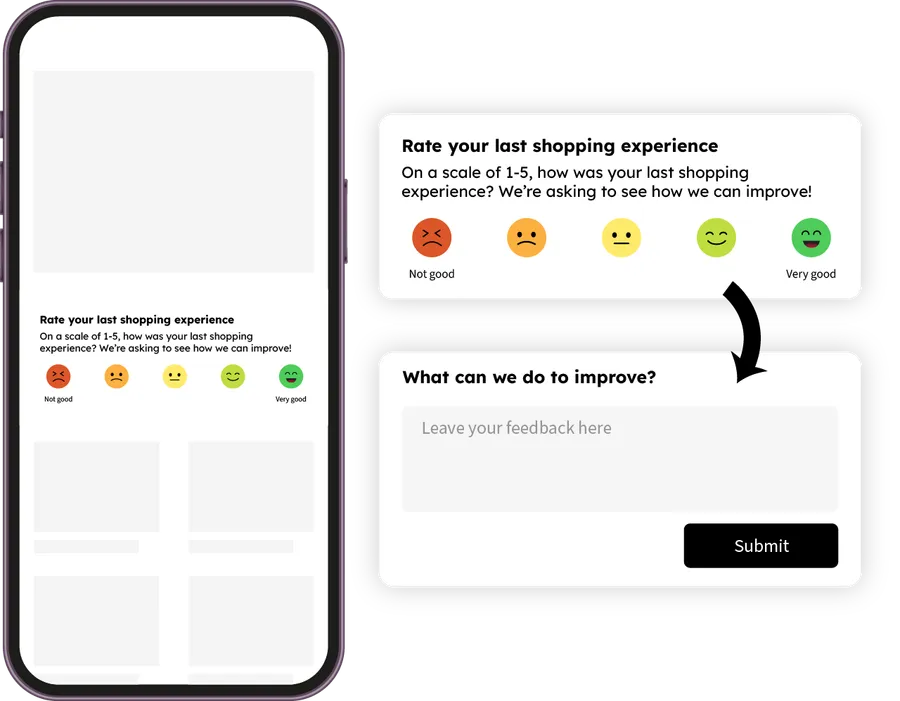
Customer satisfaction score (CSAT) measures how satisfied customers are with a specific purchase, interaction or experience. You ask one question, such as "How satisfied are you with your order?", and customers answer on a short scale, usually 1 to 5. Your CSAT is the share of customers who answer 4 or 5.
Why it matters
Plenty of unhappy customers never tell you. They don't email support or leave a review. They buy less often, or stop. By the time it shows up in your sales numbers, you no longer know which part of the experience caused it.
CSAT asks while the experience is fresh. Because the question is tied to one event, such as a delivery, a support chat or a new checkout, a drop in the score points to something specific you can fix.
That is also how CSAT differs from Net Promoter Score (NPS). NPS measures how loyal customers are to your brand over time. Use CSAT when you want to know how something went, and NPS when you want to know how the whole relationship is going.
How to calculate it
CSAT = (number of 4 and 5 answers / total number of answers) × 100
If 200 customers answer and 150 of them choose 4 or 5, your CSAT is 75%.
A standard CSAT survey has two parts:
- The rating: one question on a fixed scale, shown as numbers, stars or smileys.
- A follow-up: an open text field asking why they gave that score.
The rating tells you whether something is wrong. The comment tells you what. Ask for the rating first, keep the survey to those two questions, and use the same scale every time so your scores stay comparable.
A single score says little on its own. The useful signal is change: a rise in low ratings after a site update, or a gap between two delivery options.
How you use it in Triggerbee
In Triggerbee, you build a CSAT survey as an onsite experience. Start from a survey template, or add the CSAT component to any campaign in the editor together with an open question for the comment.
- Ask the right people. Target the survey with an audience, such as customers who just bought, visitors who keep leaving without buying, or members of a CRM segment.
- Follow the score. Results go to the CSAT dashboard under Assets > Form responses > CSAT, where you see how the score changes over time. Survey responses and response rate also show under the Listen objective in your onsite experience dashboard.
- Act on the answer. CSAT is an audience filter. Target visitors who answered within a certain range, for example a follow-up question for everyone who gave a 1 or 2.
- Send it to your CRM. Sync survey answers to your CRM or email tool, so a low score can shape the next email too.
Read more about surveys in Triggerbee.
Example
A beauty brand shows a CSAT survey on the order confirmation page: "How satisfied are you with your shopping experience today?" Customers who answer 1 or 2 get a short follow-up on their next visit, asking what went wrong, with options such as delivery, product information and checkout. Customers who answer 5 see an invitation to the loyalty program. When the comments from low scores keep mentioning the same payment method, the team knows what to fix first.
Common mistakes
- Asking at the wrong moment. A survey on the product page interrupts a purchase. Ask right after the event you want to measure.
- Showing it to everyone. A customer who has not bought anything cannot rate the delivery. Target the survey to people who went through the experience.
- Chasing the number. A high score with no comments teaches you less than a lower score with fifty reasons.
- Collecting without acting. If low scores never lead to a change or a follow-up, customers stop answering.
For more question ideas and examples, read our guide to CSAT surveys.